
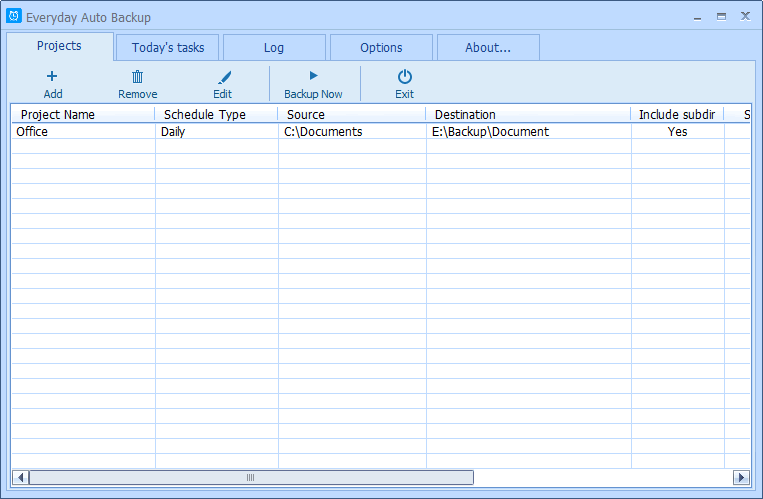
Everyday Auto Backup is an easy-to-use
software designed to backup files automatically.
After you added or modified a backup project, this software
will immediately generate the list of today's tasks according
to the project's settings.
When the start time of a backup task arrives, this software
will automatically start the backup task in the background
without manual intervention.
When the date changes (the new day arrives or the date
of the computer is modified), this software will immediately
generate the backup task list for today according to the
projects' settings.
The backup project allows you to set:
- The name of the backup project.
- Source directory and destination directory.
- Backup type: Minutely, Hourly, Daily, Weekly, Monthly.
- Whether to include the suddirectories.
- The start time (for Daily, Weekly, Monthly).
- Whether to check the file time. If Yes the backup
task will only backup newer or modified files.
Requirements:
1. Windows 95/98/ME/NT/2000/XP/2003/Windows 7.
2. About 2 Meg of disk space.
Dec/16/2009
Everyday Auto Backup 2.0 released. Download it now.
What's new:
* New skin.
* Bug fixed.
* New option added: Ignore files.
May/14/2009
Everyday Auto Backup 1.20 released.
What's new:
* If the source
directory doesn't exist,
or the target directory doesn't exist and can not be created for any reason, this software will warn you.
Oct/29/2007
Everyday Auto Backup 1.12 released.
What's new:
* Bug fixed.
Jul/18/2007
Everyday Auto Backup 1.10 released.
What's new:
* New function "Backup Now" added.
Apr/07/2006
Everyday Auto Backup 1.02 released.
What's new:
* Fixed a bug that may get wrong filename and folder name.
Special thanks to Adam and Wesley who helped us to find
and fix the bug.
Mar/16/2006
Everyday Auto Backup 1.0 released.
Backup Software List
(total: 380)...
|